Waytrel Journal · Web development
5 Website Builder Alternatives for Growing Businesses
Five routes beyond a website builder — Webflow, WordPress, headless CMS, a hybrid and custom development — with honest limits, illustrative budgets and the signs that a move is worth it.
Discuss my website ↗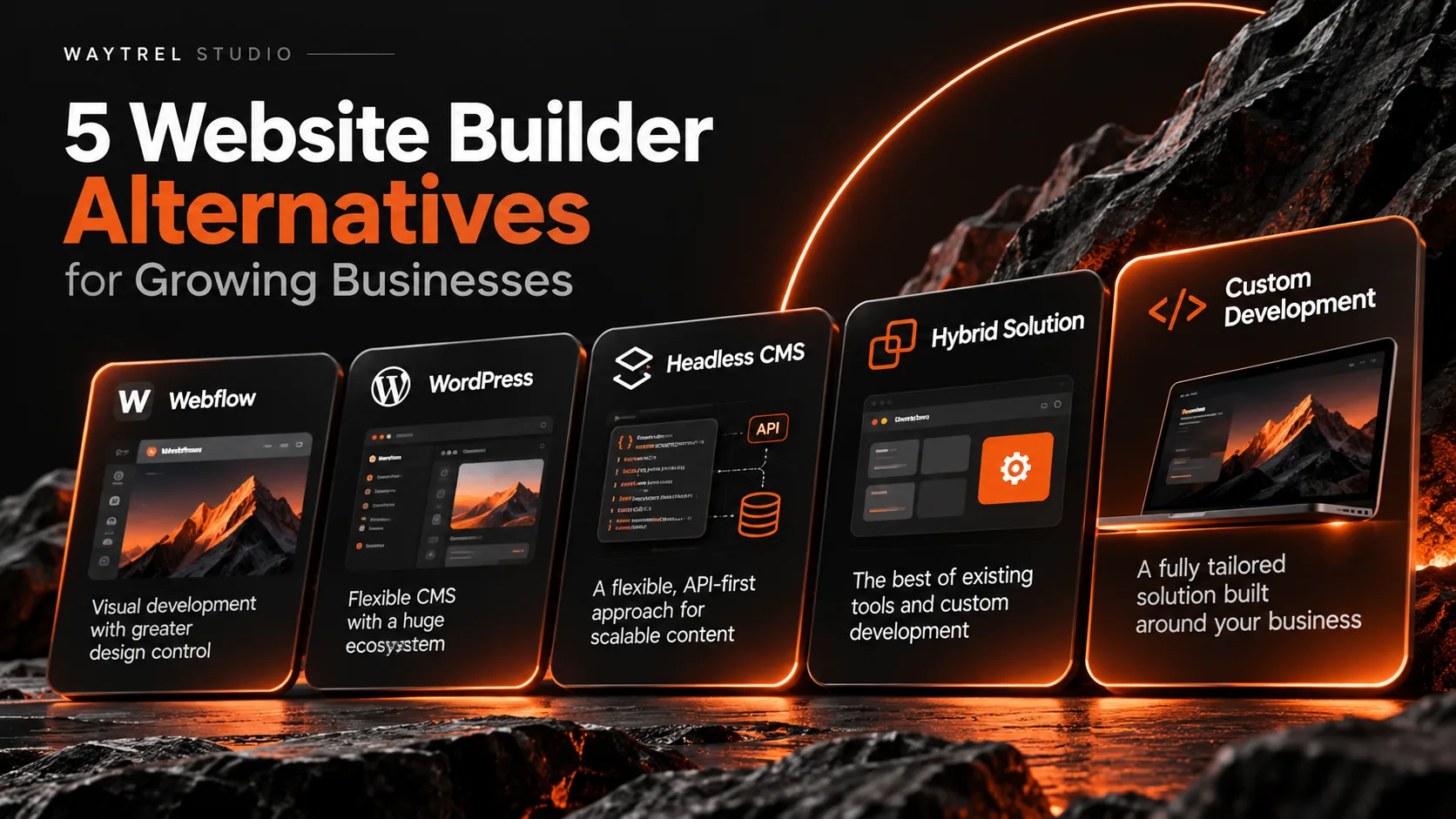
On this page
A website builder answers a simple question: how do we get a professional site online without hiring a developer? For a brochure site, a portfolio or a young business, Wix, Squarespace and similar platforms do that job well.
Growth changes the question. The site has to connect to a CRM, support several languages, run a booking flow, publish to more than one channel or look like nothing else in the market. Drag-and-drop starts to constrain the work instead of speeding it up.
This guide compares five directions that businesses move to: Webflow, WordPress, a headless CMS, a hybrid build and fully custom development. For each one it covers where the approach helps, where it stops helping and when the move is justified.
One rule applies to all five: the platform is a consequence of the requirements, not the starting point. A tool that fits the job beats one with a longer feature list that still has to be fought at every release.
Why businesses outgrow a website builder
A builder bundles hosting, templates, a content editor and a set of standard features. That bundle is what makes it fast at the start, and what becomes limiting later.
The reasons for looking elsewhere tend to repeat:
- Design limits. Distinctive layouts, unusual interactions and non-standard page structures are hard to build inside a template system.
- Integrations. A CRM, an ERP, a booking engine or an internal API often needs workarounds, a middleware layer or a feature the platform does not offer.
- Performance control. Some platforms hide rendering, caching and script loading, which leaves little room to fix Core Web Vitals.
- Content structure. Multilingual sites, large catalogues and editorial workflows with review stages need a content model, not just pages.
- Custom functionality. Client portals, quoting engines, subscriptions and complex search rarely fit standard modules.
- Platform dependence. Designs, content and integrations are tied to one vendor, and leaving later costs more than choosing well now.
None of this makes builders a bad choice. It means the requirements have outgrown the tool, which is a normal stage for a growing company.
1. Webflow: visual development with more design control
Webflow is a visual development platform. It gives more control over layout, typography, responsive behaviour and interactions than a template-first builder, while still hosting and managing the result.
It suits teams that care about how the site looks and want a designer to work directly in the browser without a full custom stack.
Why businesses choose Webflow
- Detailed visual control over breakpoints and layout
- Interactions and animation built without a separate frontend team
- A CMS for structured content and reusable components
- Managed hosting, publishing and backups
- SEO fields, redirects and sitemap controls
For marketing sites, portfolios and content-driven business sites, Webflow can be the middle ground between a builder and a custom build.
Where Webflow has limits
Webflow remains a closed platform. Complex backend logic, customer accounts, pricing engines or unusual data flows usually need external services and custom code. Plan limits and costs also grow with content volume, seats and traffic, so the long-term bill deserves a look before a migration.
Best for
Brand-led marketing sites, creative businesses and teams that want a distinctive visual result without owning the whole stack.
2. WordPress: flexible content management and custom development
WordPress is an open-source content management system used for everything from a personal blog to a complex business site.
Unlike a closed builder, self-hosted WordPress gives developers control over themes, plugins, the server and custom functionality. A properly built WordPress site has little in common with a default installation.
Why businesses choose WordPress
- Open-source software with no licence fee
- Custom themes and plugins
- Flexible editing for editors and authors
- Mature SEO tooling
- eCommerce through WooCommerce
- Custom API integrations
- A large developer ecosystem
- A choice of hosting and infrastructure
Developers can build custom blocks, structured content, integrations and deployment workflows on top of WordPress. The platform is a base, not a ceiling.
Where WordPress has limits
Flexibility brings responsibility. Plugins age, dependencies multiply and inconsistent development shows up as slow pages and security incidents. WordPress needs updates, backups, monitoring and someone who owns them.
For heavily specialised applications, a framework built for that job may fit better than a CMS with plugins on top.
Best for
Content-heavy business sites, editorial platforms, eCommerce stores and organisations that want flexible publishing with room for custom work.
3. Headless CMS: separate content from presentation
A headless content management system keeps content in one place and delivers it through an API to a separate frontend. Editing and presentation stop being the same application.
That separation matters when the same content has to appear on a website, a mobile app, a customer portal, screens in an office and other channels.
Why businesses choose a headless CMS
- Structured content models instead of pages alone
- API-based delivery to any frontend
- Publishing to several channels from one source
- A frontend built with Next.js, Astro or another framework
- Independent deployment of content and interface
- Custom rendering and caching strategies
- Cleaner integration with other systems
Editors keep working in the CMS while developers own the frontend and its performance. Sanity, Contentful and Strapi are common examples, and each has its own hosting, pricing and editor experience.
Where a headless CMS has limits
Headless architecture needs more planning than a builder: frontend development, hosting, deployment, previews and integration maintenance all become separate concerns.
It also raises cost when the project does not genuinely need separation. A headless CMS does not make a site faster or better optimised by itself; that depends on the frontend, the caching strategy and the implementation.
Best for
Growing businesses with complex content requirements, multilingual platforms and organisations that publish across several digital channels.
4. Hybrid: keep the platform, replace what holds you back
Not every business has to abandon its platform to gain flexibility. A hybrid build combines established software with custom development.
- WordPress for content editing
- A custom frontend for presentation
- A third-party commerce platform for payments
- Custom APIs for internal integrations
- External services for authentication or automation
The aim is to reuse proven software and build only the components the business actually needs.
Why businesses choose a hybrid
- Established tools stay in place
- Less custom code to own
- Specialised workflows get the functionality they need
- Existing systems remain connected
- Editors keep a familiar interface
- New features arrive in stages instead of one big release
For a company with a working site, a hybrid can also be a migration path: the catalogue, the blog or the checkout moves later, while the business keeps selling in the meantime.
Where a hybrid has limits
Every system added to the stack adds an integration surface: authentication, data synchronisation, service availability, API changes and often more than one hosting environment.
Without a clear architecture, a hybrid becomes harder to maintain than either a single platform or a clean custom build.
Best for
Businesses that need specialised functionality but want to keep the useful parts of their current stack.
5. Custom development: build around the business
Custom website development starts from the business process and builds the site around it, instead of fitting the process into a platform's features.
It does not mean writing everything from scratch. Frameworks, libraries and services are still used where they fit; the difference is that the overall solution is designed for the case.
Why businesses choose custom development
- Distinctive brand experiences
- Advanced interactive interfaces
- Customer dashboards and portals
- Custom booking and subscription systems
- Specialised eCommerce workflows
- Complex API integrations
- Internal business automation
- Advanced search and filtering
- Content models built for the catalogue
- Direct control over performance and infrastructure
It also lets developers choose technology by requirement rather than by platform restriction.
The value of a bespoke interface
For some businesses the site is more than an online brochure. It is part of the product, the identity and the customer experience.
Custom development makes it possible to create interactions, layouts and tools that are hard to reproduce with standard templates. It also makes it possible to remove the parts nobody uses.
Customisation needs a reason. Complexity that no one asked for adds cost to every future change without improving the experience.
Where custom development has limits
- A higher initial investment
- More planning and discovery before the build
- Professional development expertise
- Ongoing technical maintenance
- Infrastructure management
- More detailed testing
A custom site is not automatically faster, safer or better ranked. Those outcomes come from engineering decisions and from what happens after launch.
Best for
Businesses with specialised workflows, complex integrations, brand-critical experiences or digital products that standard platforms cannot implement efficiently.
Website builder alternatives: quick comparison
| Approach | Design freedom | Technical flexibility | Maintenance |
|---|---|---|---|
| Webflow | High inside the platform | Moderate | Mostly managed by the platform |
| WordPress | High with custom development | High | Needs active maintenance |
| Headless CMS | High | High | Needs technical ownership |
| Hybrid | High | High | Depends on the systems combined |
| Custom development | Very high | Very high | Needs dedicated support |
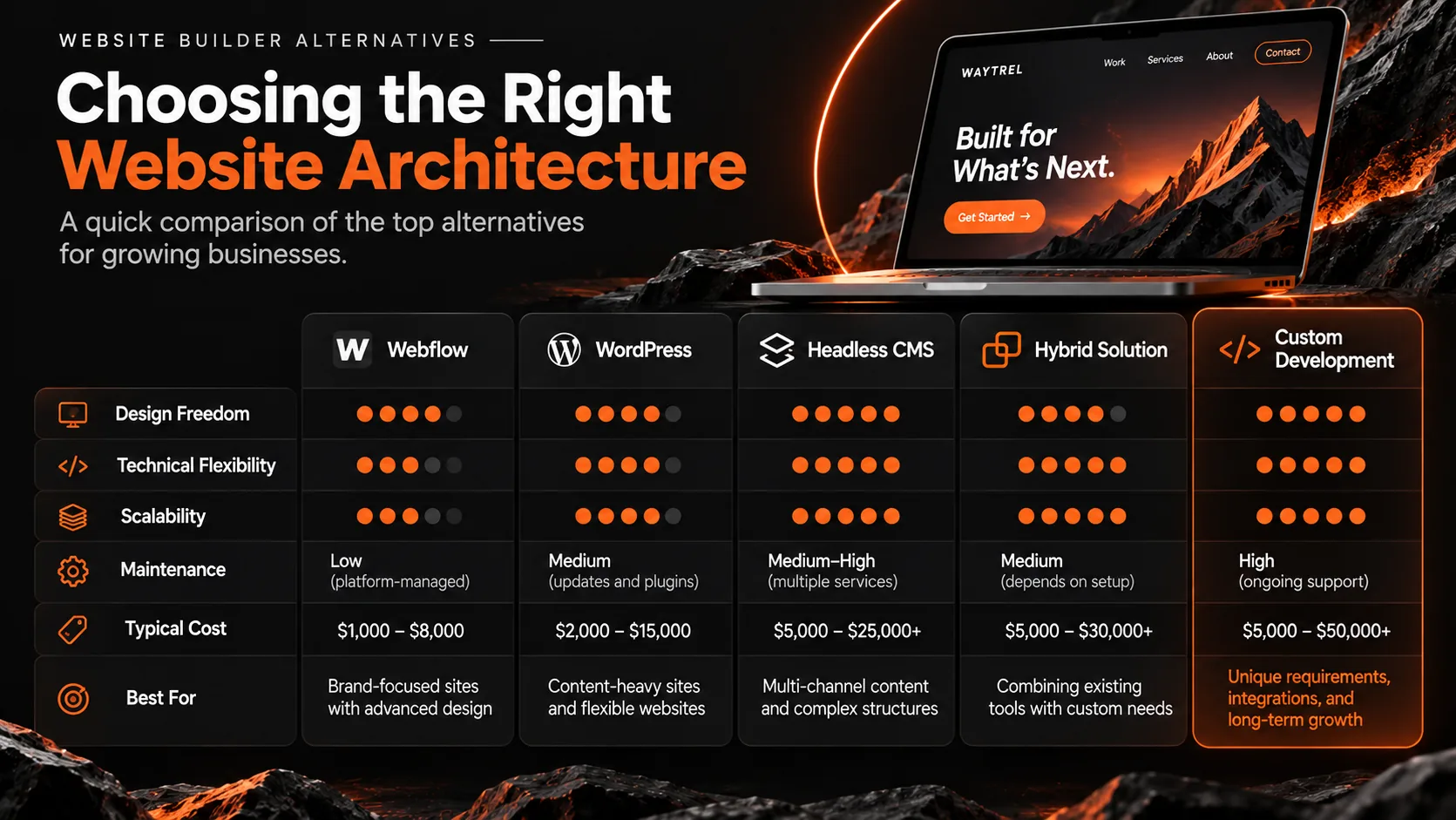
The table is a rough map, not a ranking. A well-built WordPress site can be more flexible than a badly planned custom application; implementation decides more than the label.
How much do website builder alternatives cost?
Budgets vary with scope. A small marketing site needs far less work than a platform with accounts, integrations and custom business logic.
The ranges below are illustrative planning figures. They are not verified market averages and not a quote from Waytrel Studio.
| Approach | Illustrative initial budget |
|---|---|
| Webflow with professional setup | $1,000–8,000 |
| Custom WordPress website | $2,000–15,000 |
| Headless CMS website | $5,000–25,000+ |
| Hybrid website architecture | $5,000–30,000+ |
| Fully custom website | $5,000–50,000+ |
Real projects can land outside these ranges. Recurring costs sit on top: hosting, platform subscriptions, third-party services, maintenance and future development.
Think beyond the first invoice
A low upfront price does not always mean a low five-year cost. A platform that needs a workaround for every new requirement gets expensive quietly.
Total cost = initial development + hosting + subscriptions + maintenance + future improvements.
The opposite mistake is just as common: a custom system for a five-page site that will not change for years. The right investment depends on what the site is expected to earn or save.
What about SEO and performance?
Businesses often switch platforms hoping for better rankings or speed. Changing the technology alone delivers neither.
SEO
Modern platforms cover the basics: metadata, redirects, clean URLs, structured content and sitemaps. Custom development adds room for advanced work:
- Complex structured data
- International SEO and hreflang
- Dynamic metadata
- Custom URL architecture
- Internal linking at scale
- Rendering strategies for search and AI crawlers
Rankings still depend on content, relevance and competition. A migration can also lose traffic when redirects, URLs and internal links are handled carelessly.
Performance
A custom frontend gives control over JavaScript, caching, images and third-party scripts. A badly optimised custom site can still be slower than a well-configured builder.
The target is a measured improvement in LCP, INP, CLS and conversion, not a change of platform for its own sake.
When should you move away from a website builder?
Migration is a project with its own cost. Before starting, name the limitations that actually hurt the business.
- The site needs functionality the platform cannot support without hacks.
- Integrations break or need constant manual work.
- The content structure no longer fits the CMS.
- The brand needs interactions or layouts the builder cannot produce.
- Performance problems cannot be solved inside the current architecture.
- Platform limits slow down every release.
- The site has become an operating system for the business, not a brochure.
If none of these is true, staying on the current platform is usually cheaper and calmer. A rebuild is not a strategy on its own.
How to choose the right alternative
Five questions narrow the choice faster than any feature list.
What should the site do?
A portfolio, an online store, a SaaS product and a customer portal have very different technical requirements. Define the business objective before comparing platforms.
How much customisation is actually needed?
If the gap is visual, Webflow or a custom WordPress build may be enough. If the gap is application logic, a dedicated architecture is more appropriate.
Who will maintain it?
Updates, monitoring, security and releases need an owner. Make sure the team or the partner can carry that work after launch, not only during the project.
What is the five-year budget?
Add hosting, subscriptions, maintenance and improvements to the launch cost. A cheaper build that needs constant fixes is rarely cheaper overall.
How important are ownership and portability?
Clarify access to source code, design files, infrastructure and content exports. Platform independence matters more when the business expects to change direction.
How Waytrel Studio approaches custom digital experiences
At Waytrel Studio the platform comes after the requirements. We start with the business goal, the content model and the people who will run the site, then choose the smallest stack that supports them.
Sometimes that means extending an existing platform with a better frontend or cleaner integrations. Sometimes it means a bespoke build with its own content model and interfaces. Both are legitimate outcomes.
A distinctive site also has to be usable, maintainable and measurable. Otherwise the design is decoration.
If you are considering a move, write down what the current site cannot do and what the business loses because of it. That list is a better starting point than a platform shortlist.
For the full process, timeline and budget breakdown, read our guide to bespoke website development. Bespoke website development
Sites that stay on WordPress or another CMS still need updates, backups and monitoring. The maintenance plans cover that side of the work. Website maintenance and support
Frequently asked questions
What is the best alternative to a website builder?
There is no single best alternative. Webflow suits visually focused marketing sites, WordPress fits content-heavy projects and custom development makes sense for specialised functionality. The decision follows the requirements, the team and the budget.
Is WordPress better than Wix or Squarespace?
WordPress generally offers more room for custom development, especially when self-hosted. Wix and Squarespace are easier to manage for businesses with standard needs and no technical team.
Is a custom website better for SEO?
Not automatically. Custom development gives more technical control, but rankings still depend on content quality, relevance and implementation. A custom site without a content strategy will not outrank a well-run site on a builder.
What is a headless CMS?
A headless CMS stores and organises content and delivers it through an API, while the frontend is a separate application. The model suits sites and products that publish the same content to several channels.
Is custom website development worth the cost?
It can be, when specialised functionality, integrations or brand requirements justify the investment. For a simple site with standard needs, an established platform usually offers better value.
Can I migrate from Squarespace or Wix to a custom website?
Yes, but content, design and integrations may need to be rebuilt or moved. A migration plan should cover redirects, metadata, search indexing and testing before launch.
Final thoughts: choose flexibility with purpose
Builders made professional websites accessible, and for plenty of businesses they remain the right choice. The mistake is staying on one after the requirements have changed, or leaving it before they have.
The five routes above cover the realistic options: visual development in Webflow, a flexible WordPress build, a headless CMS, a hybrid, or a fully custom site.
The strongest choice is the one that fits the business, the people who will run the site and the budget for the next few years.
Related services
Related reading
- Bespoke website development: process, cost and benefits
- Website maintenance: what a plan covers and what it costs
Prepared by Waytrel Studio. Platform descriptions are general and based on public documentation; the budgets are illustrative planning ranges, not market averages and not a quotation. Waytrel Studio is not affiliated with the platforms named here.